CA Tax Reporter for Woocommerce

Is filing sales tax stressing you out?

California sales tax filing requires more than a single statewide number. CDTFA’s Schedule A asks you to break down your taxable sales and tax collected by jurisdiction — county by county, city by city. For WooCommerce store owners filing manually, that means digging through orders, sorting by shipping address, and tallying numbers by hand every quarter. It’s tedious, error-prone, and eats up time you don’t have right before a filing deadline.

CA Sales Tax Reporter automates that entire process. It queries your WooCommerce orders for any quarter, filters to California shipping addresses, and exports a formatted Excel spreadsheet with everything you need to complete your CDTFA filing — taxable sales and tax collected broken down by county on one tab, and a full Schedule A jurisdiction breakdown (e.g. Los Angeles County / Pasadena, Orange County / Anaheim) on another. Refunds are handled correctly, coupons are accounted for, and any orders that can’t be automatically matched to a jurisdiction are flagged for manual review.

CA Sales Tax Reporter works with your existing WooCommerce tax setup — whether you use WooCommerce’s built-in tax tables, WooCommerce Tax, or another compatible tax plugin. It reads the taxable sales amounts and tax totals that WooCommerce has already recorded on each order and organizes them for filing. The accuracy of your report depends on your tax configuration being correct — if WooCommerce is calculating and collecting the right amounts at checkout, the reporter will reflect that accurately. It is a reporting and export tool, not a tax calculation engine.

No subscription service. No per-transaction fees. No sending your sales data to a third party. Run it once a quarter, export the spreadsheet, and file.
$49 / year
purchase plugin
ca sales tax reporter plugin for woocommerce

key features

Who This Is For

CA Sales Tax Reporter is built for WooCommerce store owners based in California who file their own quarterly sales tax returns with the CDTFA. If you’re spending time every quarter manually sorting orders into a spreadsheet and tallying totals by city, this plugin eliminates that work entirely.

What It Does

California’s Schedule A requires you to break down your taxable sales and tax collected by jurisdiction — not just a single statewide total, but line by line for every county and city where you had sales. The plugin automates that entire process:

  • Queries your WooCommerce orders for any quarter you select
  • Filters to California shipping addresses only
  • Resolves the correct CDTFA jurisdiction for each order based on shipping ZIP code and city (e.g. Los Angeles County / Glendale, Orange County / Anaheim)
  • Correctly handles full and partial refunds
  • Accounts for coupon discounts in taxable sales totals
  • Exports a formatted Excel spreadsheet with four tabs: County Summary, Schedule A breakdown, Order Detail, and a flagged list of any addresses that couldn’t be automatically resolved

What You Get

  • The plugin zip file, ready to install via WP Admin → Plugins → Add New → Upload
  • Access to future updates

Requirements

  • WordPress 6.0 or higher
  • WooCommerce 7.0 or higher
  • PHP 8.1 or higher

Important Note

CA Sales Tax Reporter is a reporting and export tool, not a tax calculation engine. It reads the taxable sales amounts and tax totals that WooCommerce has already recorded on your orders. The accuracy of your report depends on your WooCommerce tax configuration being set up correctly. This plugin does not constitute tax advice — consult a qualified tax professional or the CDTFA directly with questions about your filing obligations.

Support

Questions about the plugin? Contact [email protected]

purchase plugin
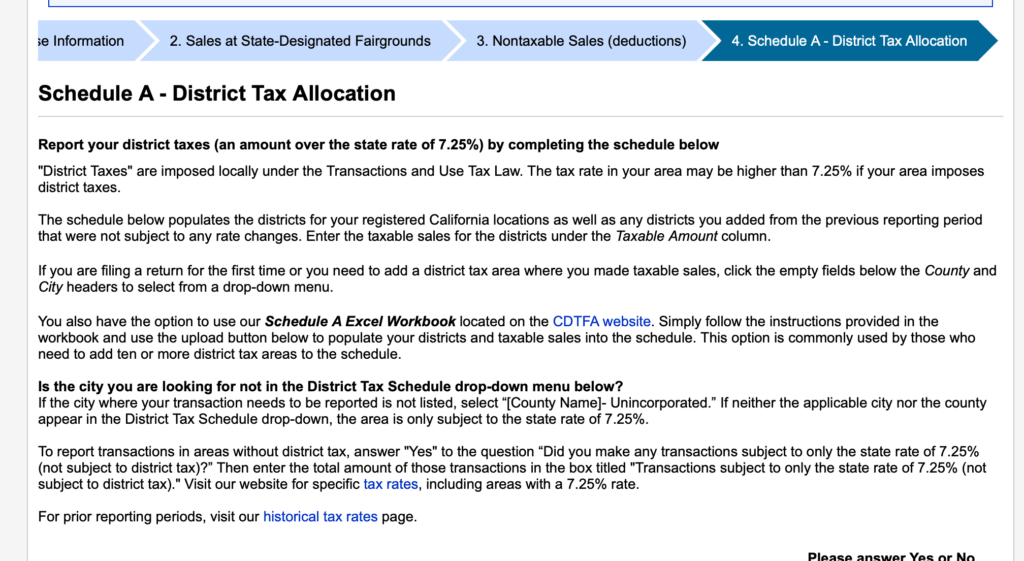
The filing form on CDTFA ( https://cdtfa.ca.gov/)

how to use the CA Tax Reporter to file your sales tax through CDTFA

The Tax Reporter is extremely simple to use:

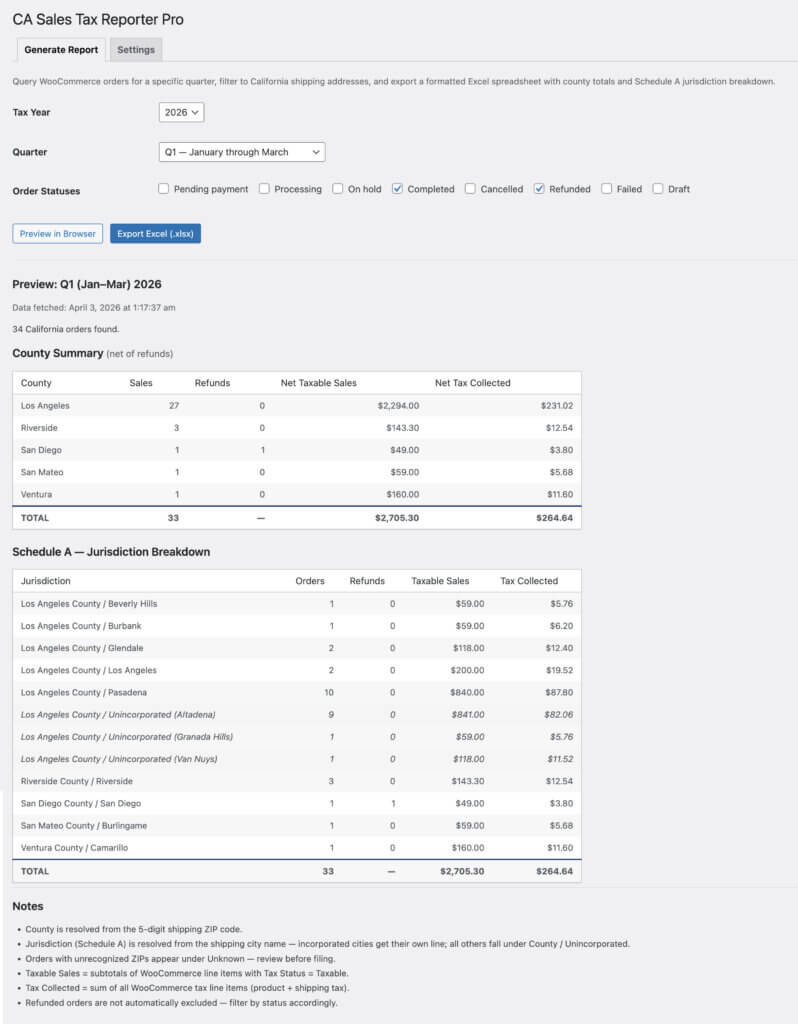
1. Open the plugin through your Wordpress dashboard under Tools –> CA Tax Reporter

1. Select your year

2. Select your quarter

3. Select the Woocommerce order status ( Completed and refunded are the default ).

4. click preview in browser and/or Export the Excel file.

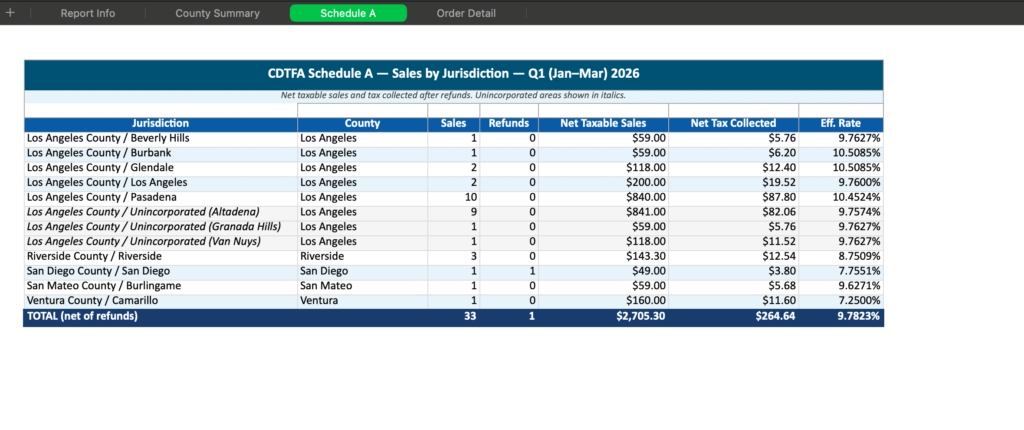
5. Copy and paste the jurisdictions from the Schedule A tab to fill in your filing on CDTFA

6. Grab a coffee! your’re done!

Woocommerce view of the dashboard

woocomerce ca sales tax reporter plugin

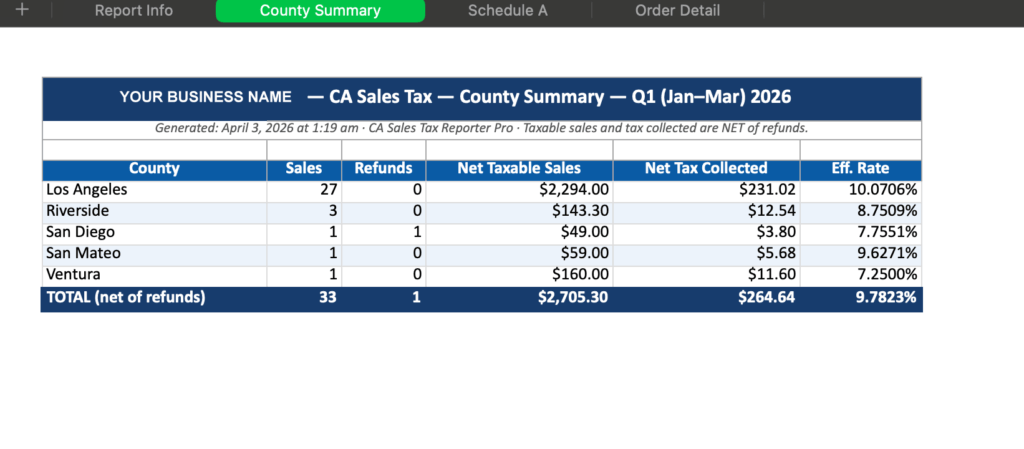
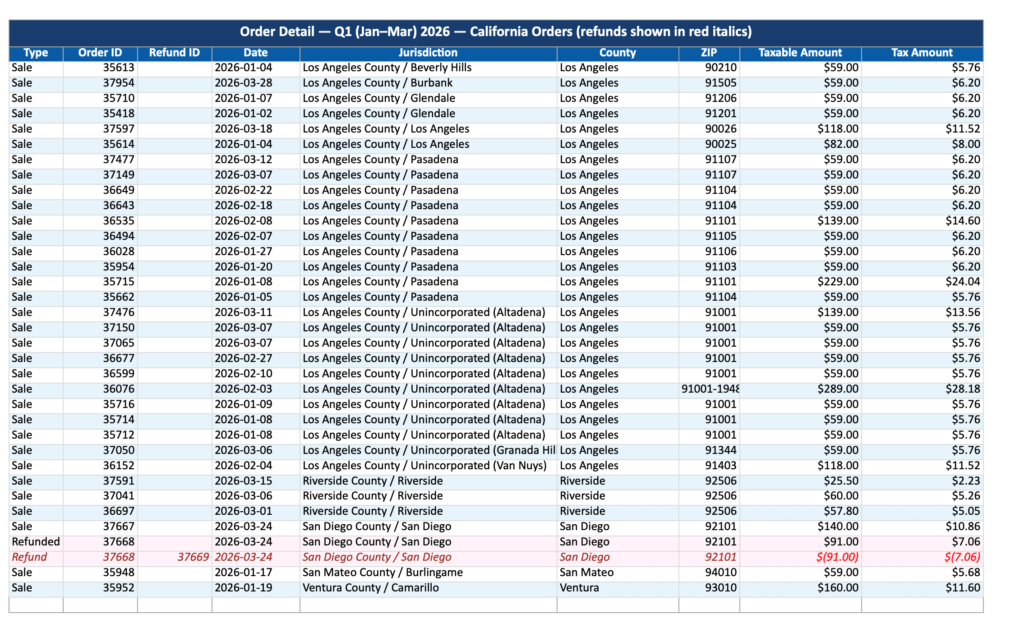
The Exported .xlsx

If you click the 'Export Excel' button in the dashboard it exports an .xlsx file. the file has 4 tabs with different tax breakdown views.
woocomerce ca sales tax reporter pluginwoocomerce ca sales tax reporter pluginpurchase plugin

faq about filing California sales tax

  • WooCommerce store owners in California file quarterly sales tax returns with the CDTFA. The return requires a Schedule A breakdown of taxable sales and tax collected by jurisdiction — meaning each county and incorporated city where sales were made. Store owners either export their order data manually and sort it into a spreadsheet, or use a reporting plugin like CA Sales Tax Reporter that automates the jurisdiction breakdown and exports a CDTFA-ready Excel file.

  • The most efficient method is to use CA Sales Tax Reporter, a WooCommerce plugin that automatically queries orders for a selected quarter, resolves the correct CDTFA jurisdiction for each California order based on shipping address, handles refunds correctly, and exports a formatted Excel spreadsheet with the Schedule A breakdown ready to file.

  • California sales tax filing requires allocating sales to specific jurisdictions defined by county and incorporated city. In WooCommerce this requires grouping orders by shipping ZIP code (to determine county) and shipping city (to determine whether the destination is an incorporated city or unincorporated area). CA Sales Tax Reporter automates this process for quarterly CDTFA filings.

  • CA Sales Tax Reporter is a WooCommerce plugin designed specifically for California sales tax filing. It produces a Schedule A jurisdiction breakdown — the county and city level report required by the CDTFA — directly from WooCommerce order data and exports it as a formatted Excel spreadsheet.

  • Not necessarily. TaxJar and Avalara are full compliance platforms that handle rate calculation, filing, and remittance automatically. For store owners who already have WooCommerce tax rates configured correctly and prefer to file manually, CA Sales Tax Reporter provides the Schedule A jurisdiction breakdown needed for quarterly CDTFA filing at a fraction of the cost, without sending sales data to a third-party service.

  • Refunds reduce taxable sales and tax collected for the jurisdiction where the original sale occurred. On your CDTFA return, refunds are netted against sales in the same jurisdiction on Schedule A. If refunds in a jurisdiction exceed sales for the quarter, enter zero for that jurisdiction and carry the adjustment. WooCommerce plugins like CA Sales Tax Reporter handle refund netting automatically in the exported report.

  • A California county is a geographic region. A CDTFA jurisdiction is more specific — it is typically a county combined with an incorporated city, such as Los Angeles County / Pasadena or San Diego County / Oceanside. Sales to unincorporated areas of a county are reported under that county’s unincorporated jurisdiction. Schedule A requires reporting at the jurisdiction level, not just the county level.

  • plugin FAQ

  • CA Sales Tax Reporter is a WooCommerce plugin that generates a California sales tax report broken down by CDTFA Schedule A jurisdiction. It queries your WooCommerce orders for a selected quarter, filters to California shipping addresses, and exports a formatted Excel spreadsheet showing taxable sales and tax collected for each county and city jurisdiction — ready to transfer directly to your CDTFA quarterly return.

  • It is designed for California-based WooCommerce store owners who file their own quarterly sales tax returns with the CDTFA and need their sales data organized by Schedule A jurisdiction.

  • No. CA Sales Tax Reporter is a reporting tool, not a tax calculator. It reads the taxable sales amounts and tax totals that WooCommerce has already recorded on your orders. Your tax rates must be configured correctly in WooCommerce before running the report.

  • Schedule A is the jurisdiction breakdown required on California sales tax returns. Instead of reporting a single statewide total, sellers must allocate their taxable sales and tax collected to each specific county and city jurisdiction where they made sales. CA Sales Tax Reporter produces this breakdown automatically.

  • The plugin resolves each order’s county from the shipping ZIP code and the city from the shipping city field. Incorporated cities (such as Pasadena or Glendale) receive their own Schedule A line. Orders shipped to unincorporated areas are grouped under the relevant county’s unincorporated line.

  • Refunds are subtracted from the taxable sales and tax collected totals for the jurisdiction where the original order was placed. Full refunds and partial refunds are both handled correctly. Refund rows are shown separately in the Order Detail tab for a complete audit trail.

  • Yes. The plugin works with any WooCommerce tax configuration including WooCommerce’s built-in tax tables, WooCommerce Tax by Automattic, and other compatible tax plugins. It reads what WooCommerce recorded at checkout — it does not interact with or replace your tax calculation plugin.

  • The export contains four tabs: a County Summary showing net taxable sales and tax collected per county, a Schedule A tab showing the full jurisdiction breakdown by county and city, an Order Detail tab with one row per order and per refund for auditing, and an Unknown ZIPs tab flagging any addresses that could not be automatically resolved to a jurisdiction.

  • Orders with ZIP codes that cannot be matched to a California county are grouped in an Unknown category and listed in a separate tab in the exported file. These should be reviewed and assigned to the correct jurisdiction manually before filing.

  • CA Sales Tax Reporter requires WordPress 6.0 or higher, WooCommerce 7.0 or higher, and PHP 8.1 or higher. It is compatible with WooCommerce’s High Performance Order Storage (HPOS).

  • No. All processing happens locally on your WordPress server. No order data, customer information, or financial figures are transmitted externally.

  • CA Sales Tax Reporter is $49 per year, which includes all updates and support.

  • I’m a full-time web designer and developer and happy to discuss your project. Contact [email protected] to discuss your project.

  • refund policy and tax disclaimer

    30-day refund if the plugin doesn’t work as described. We’re unable to offer refunds if you simply change your mind after downloading.

    The plugin is a reporting tool, not a tax calculation engine.

    Accuracy depends entirely on the user’s WooCommerce tax configuration.

    The plugin does not constitute tax advice.

    Users are responsible for verifying their filings with a qualified tax professional or the CDTFA directly.

    <script type="application/ld+json">
    {
      "@context": "https://schema.org",
      "@type": "SoftwareApplication",
      "name": "CA Sales Tax Reporter",
      "description": "A WooCommerce plugin that generates CDTFA-ready California sales tax reports broken down by Schedule A jurisdiction. Exports taxable sales and tax collected by county and city for quarterly filing.",
      "applicationCategory": "BusinessApplication",
      "operatingSystem": "WordPress",
      "url": "https://mfstudios.xyz/plugins/ca-tax-reporter",
      "offers": {
        "@type": "Offer",
        "price": "49.00",
        "priceCurrency": "USD",
        "priceSpecification": {
          "@type": "UnitPriceSpecification",
          "price": "49.00",
          "priceCurrency": "USD",
          "unitCode": "ANN",
          "billingDuration": 1,
          "billingIncrement": 1
        }
      },
      "author": {
        "@type": "Organization",
        "name": "MFStudios",
        "url": "https://mfstudios.xyz"
      },
      "softwareVersion": "1.0.0",
      "releaseNotes": "Initial release",
      "requirements": "WordPress 6.0, WooCommerce 7.0, PHP 8.1"
    }
    </script>